
SMS Program
AppStudio35 Staff Texts
Text messages from AppStudio35 to its staff about their work.
Last updated: November 19, 2026
AppStudio35 Staff Texts is the text message program of App Studio 35 Inc. (“AppStudio35”). Messages come from AppStudio35, through its assistant (software that sends and answers texts for AppStudio35), from AppStudio35's registered local number.
Who can sign up
AppStudio35 staff only: people with a staff account on internal.appstudio35.com. The program is not open to customers or the public. Signing up is optional and not a condition of your employment.
How to sign up
This is the only way to join the program:
- Sign in at https://internal.appstudio35.com and open Settings > Text messages.
- Enter your mobile number and tick the consent checkbox. The box is unchecked by default, and ticking it is optional.
- Click Send code. You receive a 6-digit code by text; enter it on the page.
- Once the code is confirmed, your consent is saved, the page shows “Subscribed”, and you receive the confirmation text shown below.
The sign-up form
The form is behind the staff sign-in, so it is shown here as a screenshot, followed by its exact wording.
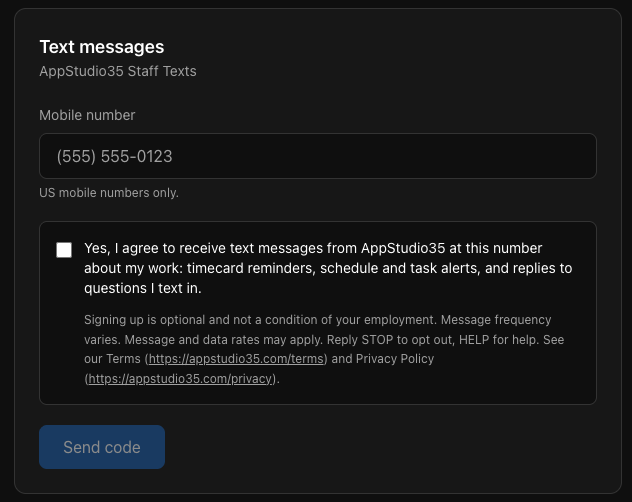
Checkbox label (unchecked by default):
Yes, I agree to receive text messages from AppStudio35 at this number about my work: timecard reminders, schedule and task alerts, and replies to questions I text in.
Disclosure shown under the checkbox:
Signing up is optional and not a condition of your employment. Message frequency varies. Message and data rates may apply. Reply STOP to opt out, HELP for help. See our Terms (https://appstudio35.com/terms) and Privacy Policy (https://appstudio35.com/privacy).
What we send
- Reminders and alerts the assistant starts: timecard reminders, schedule and task alerts.
- Replies to questions you text in.
- Program messages: sign-up confirmation, HELP and STOP replies.
We never send marketing, promotions or third-party content.
Program messages
Confirmation (after you sign up):
AppStudio35: You're signed up for AppStudio35 staff texts. Msg frequency varies. Msg & data rates may apply. Reply HELP for help, STOP to opt out.
Reply to HELP:
AppStudio35 staff texts: for help email info@appstudio35.com or visit appstudio35.com/contact. Msg frequency varies. Msg & data rates may apply. Reply STOP to opt out.
Reply to STOP:
AppStudio35: You're unsubscribed from AppStudio35 staff texts and will get no more messages. Reply START to resubscribe.
Opting out and resubscribing
Reply STOP to opt out, HELP for help.
- Opt out: reply STOP (or STOPALL, UNSUBSCRIBE, CANCEL, END, QUIT) to any message, or use Settings > Text messages > Unsubscribe.
- Resubscribe: Settings > Text messages > Resubscribe (same checkbox and wording; a new number must be confirmed with a code again), or reply START (or YES, UNSTOP).
- Changing your phone number ends the subscription for the old number; the new number needs the full sign-up.
Message frequency and cost
Message frequency varies (it depends on your schedule and your questions). Message and data rates may apply. AppStudio35 does not charge for texts. Carriers are not liable for delayed or undelivered messages.
Privacy
AppStudio35 does not sell, rent or share mobile numbers or SMS opt-in data with third parties or affiliates for marketing or promotional purposes.
Mobile numbers are shared only with our SMS provider (Twilio) to deliver the messages.
For every opt-in and opt-out we keep a record of the staff account, mobile number, date and time, action (opt-in or opt-out), method (web form, settings, text reply, number changed), the exact consent wording and its version, IP address, browser (user agent), and whether a code was confirmed. Full details are in our Privacy Policy. The program terms are in our Terms and Conditions.
Help and support
Reply HELP to any message, email info@appstudio35.com, or visit appstudio35.com/contact.